- Connect Us
Get in touch with us—we’d love to hear from you! Whether you have a question, feedback, or need support, our team is here to help. Email us at support@alphavex.app
Fast Responce
Reliable Support
Worldwide Support
we're Here to Help
Reach out for app support, workouts, questions, or any thing you need
Share your ideas
Have a feature request or suggestion? we'd love to hear from you.
Genral Inquiries
Questions about AlphaVex?
You can also email us directly at
support@aplhavex.app
we'll get back to you as soon as Possible
Support Hours
Monday - Friday
9:00 AM - 6:00 PM
- FAQ'S
Contact & Support FAQs
Find answers to the most common questions about AlphaVex. From workouts and nutrition to recovery and account support, we’re here to help.
You can reach our support team by emailing us at support@alphavex.app. Whether you have a technical issue, feedback, or a general inquiry, we’re here to help. AlphaVex is currently completely free to use with no subscription required. We aim to respond to all emails within 24–48 business hours.
Please send us a detailed description of the issue along with your device model, iOS version, and screenshots or screen recordings if possible on this Mail: support@alphavex.app. This helps us investigate and resolve the issue faster.
Absolutely! We love hearing ideas from our community. Submit your feature request through the contact form, and our product team will review it for future updates.
Make sure your Apple Watch is paired with your iPhone, Bluetooth is enabled, and both devices are running the latest software. If the issue continues, contact our support team for assistance.
Check your internet connection, ensure Apple Health permissions are enabled (if you’re using Health integration), and verify you’re signed into the correct account. If syncing still doesn’t work, we’re here to help.
Yes. Simply sign in with the same registered mobile number on your new device, and your synced data will be restored automatically.
AlphaVex is available on the Apple App Store. Visit the App Store, search for AlphaVex, and install the app to start your fitness journey.
Yes. Create unlimited custom workout templates with exercises, sets, reps, rest timers, supersets, notes, and more.
No. AlphaVex works perfectly on your iPhone. An Apple Watch simply unlocks additional features like live workout tracking, heart rate monitoring, and workout syncing.
If you still need assistance, please email us at support@alphavex.app. Our support team will review your request and respond as soon as possible.
Socials
Follow us on social media for the latest updates,
fitness tips, and behind-the-scenes content


- join our community and stay motivated every day
- Free to Download
Plan workouts, track progress, monitor nutrition, analyze recovery, and get AI-powered fitness guidance—all in one powerful app.
Track Every Workout
Log sets, reps, weights, and cardio sessions with ease.
AI Fitness Coach
Get personalized workout and recovery insights powered by Alpha AI.
Nutrition Tracking
Monitor calories, macros, and daily nutrition in one place.
Progress Analytics
Visualize your strength, body metrics, and fitness journey over time.
Recovery & Health
Track sleep, recovery, hydration, and readiness to train.
Secure Cloud Sync
Your fitness data stays backed up and available across all your devices.
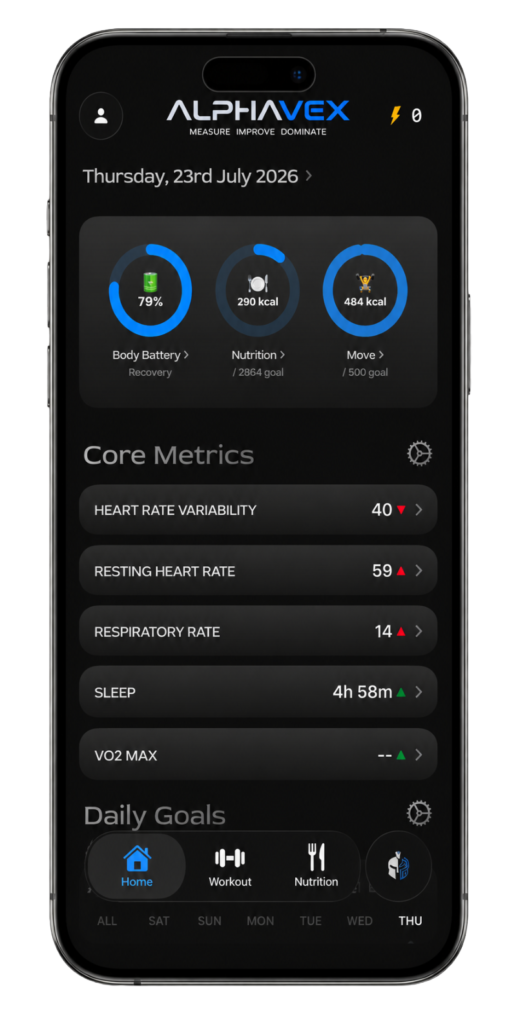
Start Your Fitness Journey Today
Install AlphaVex and take control of your workouts, nutrition, recovery, and progress—all from one app.